
bacula in the enterprise part 2
2011-07-23
Software
As mentioned many times, this is a FreeBSD based environment. Some good sysinfo output below:
Operating system release: FreeBSD 8.2-RELEASE
OS architecture: amd64
Kernel build dir location: /usr/obj/usr/src/sys/GENERIC
Currently booted kernel: /boot/kernel/kernel

Currently loaded kernel modules (kldstat(8)):
zfs.ko
opensolaris.ko
Bootloader settings for the Director/Database node:
The /boot/loader.conf has the following contents:
kern.ipc.semmni=1024
kern.ipc.semmns=2048
kern.ipc.semmnu=1024
All of the storage nodes and the director are running a GENERIC kernel with very few system tweaking. One of the storage nodes has a Chelsio 10Gb controller, but that hasn’t had a high enough load to crack the 1Gb/sec barrier.
I’m using Bacula from the ports tree, and the directory has a special Make flag to build with gcc’s debugging symbols. Jenny worked on getting that setup when we were having some stability issues.
The Bacula configuration one the director node is backed by a git repository. It adds a little bit of complexity for a systems administrator, when they want to add a client, but the benefit is clear. This backup project actually enforces change control and tracks all of the commits by who.
I’ve also setup Redmine as a project front-end, and I’ve begun to file tickets and reference what commit fixed what. This not only tracks my progress, but it is the first time I’ve had a backup server that was clearly documented and had some type of accountability.
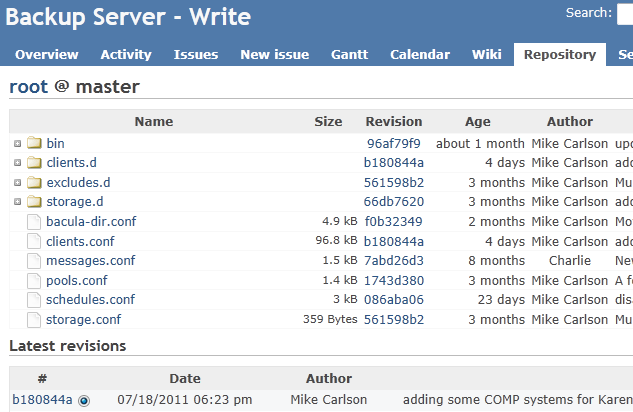
A snippet of the Redmine site
The Structure
I’ve compared projects like bacula to a large box of LegosTM. It doesn’t enforce a structure by any means, and I’ve taken it upon myself to add meaning to the otherwise flat and incomprehensible bacula-dir.conf
The Bacula Port on FreeBSD installs all configuration files in /usr/local/etc.
Write, the Director, only contains the following in /usr/local/etc/bacula-dir.conf:
@/usr/local/etc/bacula/bacula-dir.conf
@/usr/local/etc/bacula/storage.conf
@/usr/local/etc/bacula/clients.conf
@/usr/local/etc/bacula/messages.conf
@/usr/local/etc/bacula/schedules.conf
@/usr/local/etc/bacula/pools.conf
As you can see, I place everything in etc/bacula/.
Here is a beautiful output of tree(1):
    bacula
    |-- bacula-dir.conf
    |-- bin
    |   |-- create_client.sh
    |   `-- package_list.sh
    |-- clients.conf
    |-- clients.d
    |   |-- 10am
    |   |-- 10pm
    |   |-- 11pm
    |   |-- 12am
    |   |-- 1am
    |   |-- 2am
    |   |-- 3am
    |   |-- 4am
    |   |-- 4pm
    |   |-- 5am
    |   |-- 5pm
    |   |-- 6am
    |   |-- 6pm
    |   |-- 7am
    |   |-- 7pm
    |   |-- 8am
    |   |-- 8pm
    |   |-- 9am
    |   |-- 9pm
    |   |-- TEMPLATE-mac
    |   |-- TEMPLATE-unix
    |   `-- TEMPLATE-win32
    |-- excludes.d
    |   |-- common.conf
    |   |-- mac.conf
    |   |-- unix.conf
    |   `-- win32.conf
    |-- messages.conf
    |-- pools.conf
    |-- schedules.conf
    |-- storage.conf
    `-- storage.d
        |-- write-01.conf
        |-- write-02.conf
        |-- write-03.conf
        |-- write-04.conf
        |-- write-05.conf
        `-- write-06.conf
Storage Nodes
All of the storage nodes are using ZFS as the filesystem/Volume manager.
write-06# zpool list
NAME         SIZE   USED  AVAIL    CAP  HEALTH  ALTROOT
filevol001  90.6T  33.3T  57.3T    36%  ONLINE  -
They all have one volume, /filevol001, and I created 512 “drives” within that volume. Effectivly, each storage node has 512 drives, and clients are randomly assigned a drive.
Since I have 6 storage nodes, I wrote a little shell script to handle the directory creation:
#!/usr/bin/env bash
i=1

while [ $i -le 512 ]
do
    install -d -o bacula -g bacula -m 770 /filevol001/drive$i
    ((i++))
done
Simple, right? I also wrote a script to generate the bacula-sd.conf file on a storage node as well:
#!/bin/bash

usage()
{
cat << EOF
    Usage $0 NUMBER > /usr/local/etc/bacula-sd.conf

    Where "NUMBER" is just a single digit indicating which storage node this is.

    Example, for write-07:
    $ make_sd.sh 7 > /usr/local/etc/bacula-sd.conf
EOF
}

i=1

if [[ -z $1 ]]
then
    usage
    exit
fi

printf "Storage {\n"
printf "\tName = write-0$1.llnl.gov-sd\n"
printf "\tSDAddress = write-0$1.llnl.gov\n"
printf "\tSDPort = 9103\n"
printf "\tWorkingDirectory = \"/var/db/bacula\"\n"
printf "\tPid Directory = \"/var/run\"\n"
printf "\tMaximum Concurrent Jobs = 516\n"
printf "}\n"

printf "#\n"
printf "# List Directors who are permitted to contact Storage daemon\n"
printf "#\n"
printf "Director {\n"
printf "\tName = write.llnl.gov-dir\n"
printf "\tPassword = \"ItsASecret\"\n"
printf "}\n"

printf "#\n"
printf "# Restricted Director, used by tray-monitor to get the\n"
printf "#   status of the storage daemon\n"
printf "#\n"
printf "Director {\n"
printf "\tName = write.llnl.gov-mon\n"
printf "\tPassword = \"ItsANotherSecret\"\n"
printf "\tMonitor = yes\n"
printf "}\n"

printf "Messages {\n"
printf "\tName = Standard\n"
printf "\tdirector = write.llnl.gov-dir = all\n"
printf "}\n"


printf "Device {\n"
printf "\tName = W0$1FileStorage\n"
printf "\tMedia Type = File\n"
printf "\tArchive Device = /filevol001\n"
printf "\tLabelMedia = yes;\n"
printf "\tRandom Access = Yes;\n"
printf "\tAutomaticMount = yes;\n"
printf "\tRemovableMedia = no;\n"
printf "\tAlwaysOpen = no;\n"
printf "\tMaximum Concurrent Jobs = 2\n"
printf "}\n"

while [ $i -le 512 ]
do
    printf "\n"
    printf "Device {\n"
    printf "\tName = W0$1FileStorageD$i\n"
    printf "\tMedia Type = File\n"
    printf "\tArchive Device = /filevol001/drive$i\n"
    printf "\tLabelMedia = yes;\n"
    printf "\tRandom Access = Yes;\n"
    printf "\tAutomaticMount = yes;\n"
    printf "\tRemovableMedia = no;\n"
    printf "\tAlwaysOpen = no;\n"
    printf "\tMaximum Concurrent Jobs = 2\n"
    printf "}\n"
    ((i++))
done
On the Directory, a storage node definition is saved in /usr/local/etc/bacula/storage.d/write-0{N}.conf, which is included in /usr/local/etc/bacula/storage.conf:
@/usr/local/etc/bacula/storage.d/write-01.conf
@/usr/local/etc/bacula/storage.d/write-02.conf
@/usr/local/etc/bacula/storage.d/write-03.conf
@/usr/local/etc/bacula/storage.d/write-04.conf
@/usr/local/etc/bacula/storage.d/write-05.conf
@/usr/local/etc/bacula/storage.d/write-06.conf
Client Generation
There are two components, the TEMPLATE file (there are three, TEMPLATE-unix, TEMPLATE-win32 and TEMPATE-mac) and the shell script.
The Client TEMPLATE File
Here is what one of the TEMPLATE files looks like:
    #
    # Client Definition, the Password here must match
    #  the clients bacula-fd.conf Client definition.
    #
    # Using Vi/m, you can easily replaced HOSTNAME with
    #  the short hostname of the client with:
    #  %s/HOSTNAME/yourhostname/
    #
    #

    Client {
        Name = HOSTNAME.llnl.gov
        Address = HOSTNAME.llnl.gov
        FDPort = 9102
        Catalog = Catalog001
        Password = "ItsASecret"
        File Retention = 40 days
        Job Retention = 1 months
        AutoPrune = yes
        Maximum Concurrent Jobs = 10
        Heartbeat Interval = 300
    }

    Console {
        Name = HOSTNAME.llnl.gov-acl
        Password = ItsASecret
        JobACL = "HOSTNAME.llnl.gov RestoreFiles", "HOSTNAME.llnl.gov"
        ScheduleACL = *all*
        ClientACL = HOSTNAME.llnl.gov
        FileSetACL = "HOSTNAME.llnl.gov FileSet"
        CatalogACL = Catalog001
        CommandACL = *all*
        StorageACL = *all*
        PoolACL = HOSTNAME.llnl.gov-File
    }


    Job {
        Name = "HOSTNAME.llnl.gov"
        Type = Backup
        Level = Incremental
        FileSet = "HOSTNAME.llnl.gov FileSet"
        Client = "HOSTNAME.llnl.gov"
        Storage = FileStorageD##
        Pool = HOSTNAME.llnl.gov-File
        Schedule = "@@"
        Messages = Standard
        Priority = 10
        Write Bootstrap = "/var/db/bacula/%c.bsr"
        Maximum Concurrent Jobs = 10
        Reschedule On Error = yes
        Reschedule Interval = 1 hour
        Reschedule Times = 1
        Max Wait Time = 30 minutes
        Cancel Lower Level Duplicates = yes
        Allow Duplicate Jobs = no
        RunScript {
            RunsWhen = Before
            FailJobOnError = no
            Command = "/etc/scripts/package_list.sh"
            RunsOnClient = yes
        }
    }

    Pool {
        Name = HOSTNAME.llnl.gov-File
        Pool Type = Backup
        Recycle = yes
        AutoPrune = yes
        Volume Retention = 1 months
        Maximum Volume Bytes = 10G
        Maximum Volumes = 100
        LabelFormat = "HOSTNAME.llnl.govFileVol"
        Maximum Volume Jobs = 5
    }

    Job {
        Name = "HOSTNAME.llnl.gov RestoreFiles"
        Type = Restore
        Client= HOSTNAME.llnl.gov
        FileSet="HOSTNAME.llnl.gov FileSet"
        Storage = FileStorageD##
        Pool = HOSTNAME.llnl.gov-File
        Messages = Standard
        #Where = /tmp/bacula-restores
    }

    FileSet {
        Name = "HOSTNAME.llnl.gov FileSet"
        Include {
            Options {
                signature = MD5
                compression = GZIP6
                            fstype = ext2
                            fstype = xfs
                            fstype = jfs
                            fstype = ufs
                            fstype = zfs
                            onefs = no
                            Exclude = yes
                            @/usr/local/etc/bacula/excludes.d/common.conf
            }
                    File = /
                    File = /usr/local
                    Exclude Dir Containing = .excludeme
        }
        Exclude {
            @/usr/local/etc/bacula/excludes.d/unix.conf
        }
    }
The Create Client Script
So here is what really makes creating clients easy for us, the create_client script.
I didn’t want to do it this way, really, so part of me is very ashamed of this tool. I would have preferred to re-write this in Python, or make a web page out of it, and let admins create clients from their desktop. Or, I would have loved to create a puppet module to handle this automagically (but that would exlcude everything that isn’t running Puppet, which is huge).
With that disclaimer, here is my create_client shell script:
    #!/usr/bin/env bash
    # usage: cclient -t unix -s 12am -h hostname
    #

    umask 022

    # Variables
    ## Randomize Schedule
    SCHEDULES="4pm 5pm 6pm 7pm 8pm 9pm 10pm 11pm 12am 1am 2am 3am 4am 5am 6am 7am 8am 9am 10am"
    s=($SCHEDULES)
    num_s=${#s[*]}
    RAND_SCHED=${s[$((RANDOM%num_s))]}
    # Randomize which storage node we use
    NODES="write-06 write-01 write-06 write-01 write-02 write-03 write-04 write-05"
    n=($NODES)
    num_n=${#n[*]}
    RAND_NODE=${n[$((RANDOM%num_n))]}

    export DRIVE=`jot -r 1 1 512`
    export BDIR="/usr/local/etc/bacula"
    export TYPE="unix"
    export SCHEDULE=$RAND_SCHED
    export HOSTNAME=""
    export STORAGE_NODE=$RAND_NODE
    export GIT_DIR="/usr/local/etc/bacula/.git"
    export CLASS="desktop"

    if [ $(whoami) == "root" ]
    then
    cat << EOF
                    Please do not run this as root. This script runs a
                    git add/commit, which is how changes are managed and
                    tracked. If you run this as root, then it shows up
                    as carlson39 or root.

                    If you encounter a problem with your normal OUN account,
                    please contact Mike Carlson, or submit a bug here:
                    https://st-scm.llnl.gov/redmine/snt/projects/bacula/issues/new
    EOF

    exit 1
    fi

    usage()
    {
    cat << EOF

            Usage: $0 [OPTION]... -h HOSTNAME

            This script will generate a bacula client definition.

            OPTIONS:
            -s      schedule, (4pm|5pm|6pm|7pm|8pm|9pm|10pm|11pm|12am|1am|2am|3am|4am|5am|6am|7am|8am|9am). The default schedule is random.
            -t      type, (unix|win32|mac), unix is the default
            -n      storage node (write-01|write-02|...), the default is random.
            -h      hostname (use the short hostname)
    EOF
    }

    cd $BDIR

    while getopts 'c:t:s:n:h:' OPTION
    do
            case $OPTION in
                    c)
                            CLASS=$OPTARG
                            ;;
                    t)
                            TYPE=$OPTARG
                            ;;
                    s)
                            SCHEDULE=$OPTARG
                            ;;
                    h)
                            HOSTNAME=$OPTARG
                            echo $HOSTNAME | egrep -q "(llnl.gov|ucllnl.org)"
                            if [ $? -eq 0 ]
                            then
                            HOSTNAME=`echo $HOSTNAME|sed -e 's/.llnl.gov//' -e 's/.ucllnl.org//'`
                            fi

                            ;;
                    n)
                            STORAGE_NODE=$OPTARG
                            ;;
                    ?)
                            usage
                            exit
                            ;;
            esac
    done

    if [[ -z $CLASS ]] || [[ -z $TYPE ]] || [[ -z $SCHEDULE ]] || [[ -z $HOSTNAME ]] || [[ -z $STORAGE_NODE ]]
    then
            usage
            exit 1
    fi

    grep -w $HOSTNAME $BDIR/clients.conf
    if [ $? -eq 0 ]
    then
            echo 'client '$HOSTNAME 'already exists...'
    else
            export RETRY_COUNT="2"

            if [ $STORAGE_NODE == "write-01" ]
            then
                    DRIVE=`jot -r 1 33 512`
                    sed -e 's/HOSTNAME/'$HOSTNAME'/g' -e 's/FileStorageD##/FileStorageD'$DRIVE'/' -e 's/\@\@/'$SCHEDULE'/' -e 's/RETRY_COUNT/'$RETRY_COUNT'/g' $BDIR/clients.d/TEMPLATE-$TYPE > $BDIR/clients.d/$SCHEDULE/$HOSTNAME.conf
                    echo \@$BDIR/clients.d/$SCHEDULE/$HOSTNAME.conf >> $BDIR/clients.conf
            else
                    export SN=`echo $STORAGE_NODE | cut -c 7-8`
                    sed -e 's/HOSTNAME/'$HOSTNAME'/g' -e 's/FileStorageD##/W'$SN'FileStorageD'$DRIVE'/' -e 's/\@\@/'$SCHEDULE'/' -e 's/RETRY_COUNT/'$RETRY_COUNT'/g' $BDIR/clients.d/TEMPLATE-$TYPE > $BDIR/clients.d/$SCHEDULE/$HOSTNAME.conf
                    echo \@$BDIR/clients.d/$SCHEDULE/$HOSTNAME.conf >> $BDIR/clients.conf
            fi

            chgrp st-bacula-admins $BDIR/clients.d/$SCHEDULE/$HOSTNAME.conf
            git add $BDIR/clients.d/$SCHEDULE/$HOSTNAME.conf $BDIR/clients.conf
            git commit
            echo 'created client definition: '$BDIR/clients.d/$SCHEDULE/$HOSTNAME.conf
            echo 'for '$HOSTNAME'.llnl.gov'
    fi
This is always a work in progress, but at the core, it is a simple sed wrapper with a lot of randomization and a git commit.
Why all the randomization?
Because I had to add around 1000 clients in a VERY short amount of time. We didn’t have a problem pushing the Bacula client to all of the platforms, nor the bacula-fd.conf file either. What I could not do was spend the time to create and manage all of the resources for each client. That is why I have so many devices/drives, so I can attempt to have a 1:1 without having to actually think about it.
So, I wrote ANOTHER script to wrap around this one when I need to do bulk client creations. I’m not going to post that, it just loops through the above command.
Pre-Job command - Package List
I only do this on the Unix/Linux clients, and I thought it was a cool idea.
Yeah, I will pat myself on the back a little bit for that :)
I exclude the Operating System from backups for two reasons, 1) to reduce backing up duplicate and reproducible data and 2) Our build/Imaging process is so quick and clean it is just faster to rebuild than restore everything.
Still, I needed a way to keep the state of installed packages/software.
This is where the pre-job command comes in handy. This part right here:
        RunScript {
            RunsWhen = Before
            FailJobOnError = no
            Command = "/etc/scripts/package_list.sh"
            RunsOnClient = yes
        }
That package_list.bash file looks like this:
#!/usr/bin/env bash

export PLIST="/root/plist.txt"

case "`uname -s`" in
Linux)
   if [ -x /usr/bin/lsb_release ]; then
       DIST=`lsb_release -d`
   fi

   # RHEL
   if [ -x /usr/bin/up2date ]; then
       rpm -qa > $PLIST
   fi

   # RHEL 5
   if [ -x /usr/bin/yum ]; then
       if [ -f /var/run/yum.pid ]; then
           echo "Yum currently in use, exiting gracefully..."
           exit 0
       else
           /usr/bin/yum list installed | awk '{print $1}' > $PLIST
       fi
   fi

   # Ubuntu
   if [ -x /usr/bin/dpkg ]; then
       /usr/bin/dpkg --get-selections | awk '{print $1}' > $PLIST
   fi
       ;;

FreeBSD)
   pkg_info|awk '{print $1}' > $PLIST
   ;;
SunOS)
   pkginfo |awk '{print $1}' > $PLIST
   ;;
esac
That file, /root/plist.txt, gets backed up.
Now we have a record of what was installed on our Unix platforms :)